Showing posts with label IT Networking. Show all posts

Block MAC Address Search in Winbox Configuration

Winbox Mikrotik can search / find Mikrotik devices connected to the network PC / our Laptop. With Winbox features we can know the Mac Address, IP Address, Identity Mikrotik, RouterOS version, and its Routerboard types as shown below:


This feature can certainly help us to identify Mikrotik connected to
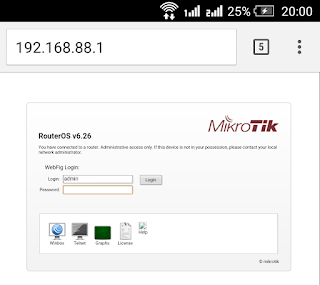
How to setting MikroTik with Android via Webfig

Now, to overcome these limitations we can use Webfig, which use Android Webfig in a very easy and practical because it does not need to install additional applications. We just use the
existing web browser on Android to access and remotely Webfig Mikrotik.

Okay, enough of its preamble, before the start of stale let her go to Tutorial Mikrotik:

1. Make sure you're on WiFi Mikrotik and can be accessed by Android.
2. Connect Android to Wifi Mikrotik.
3. Open the Web browser on Android.
4. Enter the IP address in the Address Bar Browser Mikrotik.


How to Make Load Balancing


Load Balance / Load Balancing Mikrotik is a technique or method to divide the load into multiple lines (links) so that the use of the path (link) to be better. Previous load balancing Mikrotik I've discussed in this article Load Balance / Load Balancing Mikrotik.


Later in this article I will discuss about

Share USB Modem Internet with MkroTik

How to Share USB Modem Internet connection with Mikrotik - Several new types of Mikrotik have already supported USB port that can be used for a variety of things. Device like a USB port on a PC, can be used for

Basic of Networking


Classification of Computer Network:
LAN (Local Area Network) is a network of computers that are connected to a computer server by using specific topologies, typically used in building area or distance that is no more than 1 km.
MAN (Metropolitan Area Network) is a network of

Description and Function of Router


A router is a device that has the ability to pass the IP packets from one network to another network that may have a lot of lines between them. Routers that are connected to the Internet network participate in a distributed routing algorithm to determine the best path for the IP packets  to pass through from one system to another system. Routing process is

Basic Components Computer Network

Basic Components Computer Network and the insight. Before we further learn Mikrotik , it's good to learn first about the foundation of Computer Network itself that this knowledge will be used also on the installation and use of Mikrotik. The computer network is a group of autonomous computers interconnected with each other, using a specific media and communication protocol , so that they can share data and information. Computer networks allow more efficient communication between users.